
For millions of Filipino families, the transfer notification from GCash is the sound of home. It means the rent is covered, the groceries are taken care of, or the school fees arrived in time. In 2025, Filipinos abroad sent a record $35.63 billion back home, according to the Bangko Sentral ng Pilipinas. Nearly 40 cents of every peso received came from the United States.
If you need to send money to GCash from USA, ShareMoney does it directly, wallet to wallet, in minutes. No bank account needed on the receiving end. This guide walks you through the full process, step by step. No surprises on fees or exchange rates.
In Filipino communities, sending money home is called “padala.” Whether you send every month or just when something comes up, this guide is for you.
What Is GCash and Why Do Filipino Families Prefer It?
GCash is the Philippines’ most widely used digital wallet, with over 90 million registered users. For many families, especially outside Metro Manila, it has replaced the need for a traditional bank account entirely. Your recipient gets an instant SMS notification the moment the transfer lands, and they can use the funds to pay bills, buy groceries, send to another family member, or withdraw cash at any partner merchant.
No paperwork. No branch visit. The money goes straight to their phone.
How to Send Money to GCash from the USA with ShareMoney
Sending directly to a GCash wallet takes four steps. The whole process takes about three minutes once your account is set up.
Step 1: Download ShareMoney and create your account.
Available on the App Store and Google Play. You will need a valid US ID and your recipient’s information ready.
Step 2: Select Philippines as your destination and choose GCash as the delivery method.
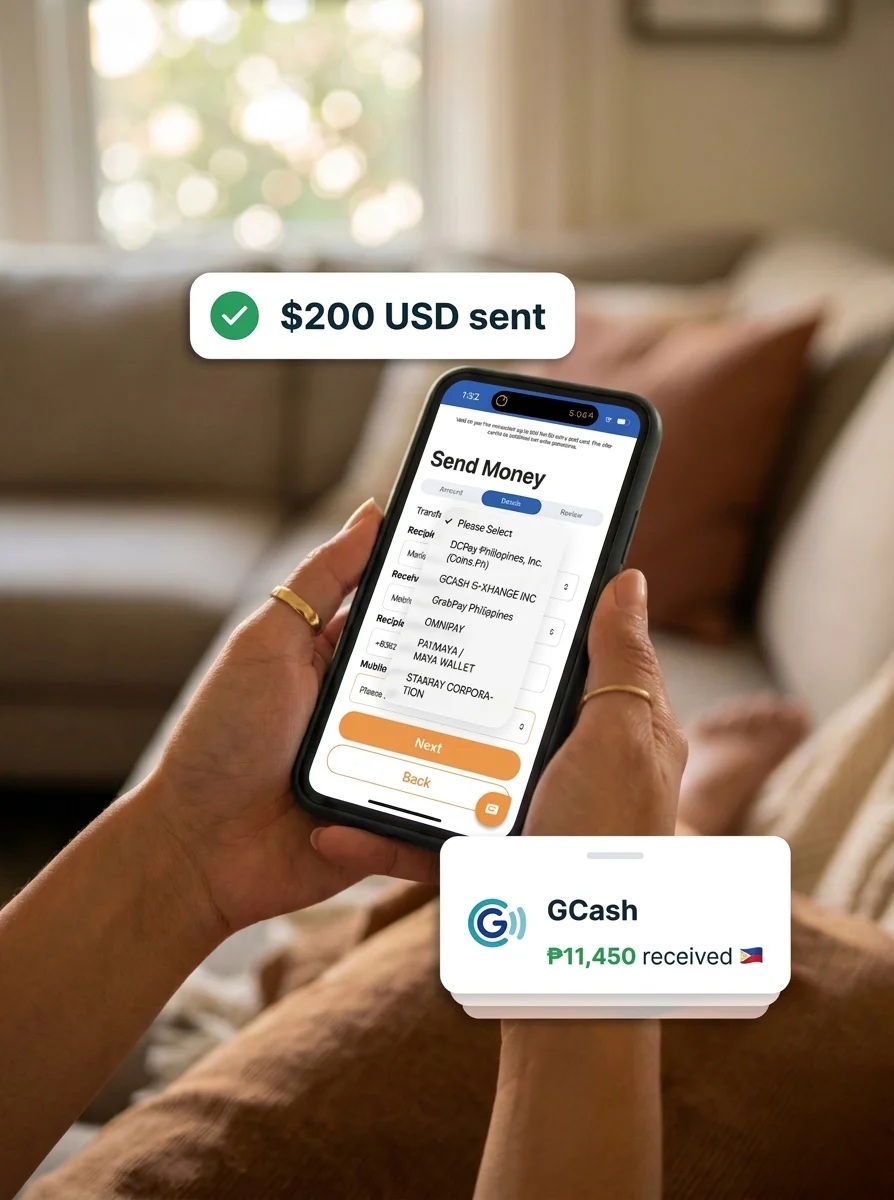
On the send screen, search for Philippines, then choose “Mobile Wallet” or “GCash” from the list of delivery options. Enter the amount you want to send in USD. You will see the exact PHP amount your family receives before you confirm. What you see is what they get.
Step 3: Enter your recipient’s GCash details.
You will need their full name as it appears in their GCash account and their registered Philippine mobile number (the one linked to their GCash wallet). Make sure the name matches exactly. A mismatch can delay or block the transfer.
Step 4: Review and send.
Check the fee and exchange rate one more time. If this is your first transfer with ShareMoney, it is free up to $500. Confirm and send. Your family gets the GCash notification within minutes.
How Fast Does the Money Arrive in GCash?
Transfers from ShareMoney to GCash typically arrive within minutes. In most cases, your recipient will see the notification before you close the app. Occasionally, local network conditions in the Philippines can slow things down a few minutes. But once ShareMoney sends, the transfer clears and GCash credits it without you needing to do anything else.
If the money has not arrived after 30 minutes, check that the mobile number was entered correctly. A single wrong digit will route the transfer to the wrong account.
What Does It Cost to Send Money to GCash from the USA?
ShareMoney shows you the full cost before you confirm: the transfer fee plus the exchange rate, with no hidden charges added at the last step. Your first transfer is free up to $500, which means your family receives the full PHP equivalent of whatever you send on that first transaction.
After your first transfer, the fee and exchange rate are always shown before you confirm. You can check the exact PHP amount your family gets before sending a single dollar. No reading the fine print after the fact.
For a full comparison of sending options to the Philippines, including bank deposits and cash pickup, see the complete Philippines guide. If your family uses BDO specifically, our guide on sending to BDO from the USA walks through that flow step by step. To track how the exchange rate moves over time, see our USD to PHP rate guide.
What Your Recipient Needs to Receive Money in GCash
Your family needs an active GCash account linked to a Philippine mobile number. Verified accounts have higher receiving limits. If your recipient has not gone through GCash’s in-app verification yet, it is worth doing before your first transfer, especially if you plan to send a larger amount.
They don’t need to do anything. GCash credits the money and sends them an SMS.
FAQ
Can I send money directly to a GCash account from the USA?
ShareMoney supports direct wallet-to-wallet transfers to GCash from the United States. You need the recipient’s full name and the Philippine mobile number linked to their GCash account.
Does my family need to do anything to receive the money?
Nothing. Once you confirm the transfer, GCash credits the funds and sends an SMS. Your family doesn’t need to accept or confirm anything.
What if the money does not arrive in GCash?
Check the mobile number you entered. Even one wrong digit will prevent the transfer from reaching your recipient. If the number is correct and the funds have not arrived after an hour, contact ShareMoney support. They are available 24/7 in English and Spanish.
Is there a limit to how much I can send to GCash?
ShareMoney has per-transaction and per-day limits that depend on your account verification level. GCash also has its own receiving limits based on whether your recipient’s account is verified. For large transfers, confirm with your recipient that their GCash account can receive the full amount before sending.
Can I also send to a Philippine bank account or cash pickup instead of GCash?
Yes. ShareMoney supports bank deposits to BDO, Metrobank, PNB, and other major Philippine banks, as well as cash pickup at LBC, Palawan Express, and M. Lhuillier. See the full Philippines transfer guide for details on every delivery option.
Send Money to GCash from USA: First Transfer Free
Whether you send every month or just for a birthday, ShareMoney puts the money in your family’s GCash wallet in minutes. Your first transfer up to $500 has no fee.